
Nurse rostering for the ward: from staffing needs to the roster board, fully compliant.
Four planning modes you can combine — from manual planning to automatic generation in a few minutes — with real-time checks on staffing needs, hour debt and regulations. And the roster board stays yours: your ward’s codes, colors and symbols.
ALISEO ES plans rosters by rostering group — the ward or service, not the individual staff member — checking MIN/OPT/MAX staffing levels, hour debt and regulatory constraints in real time. Four planning modes you can combine (manual, grids/shift matrices, automatic completion, automatic generation with the optimization engine) lead to the monthly roster board with codes, colors and counters, ready for compliant validation and publication to staff.
Last updated: 5 July 2026
The 4 concepts the roster is built on
Rostering group (RG)
The planning unit is the ward or service, not the individual person: the RG aggregates the staff of the same cost/responsibility center, can be structured into sub-services and professional roles and can have an associated medical discipline (useful for staff loans and redeployments between wards).
Staffing levels (MIN / OPT / MAX)
Staffing needs are declared by time slot and by day, public holidays included: MIN and MAX are blocking thresholds, while OPT highlights staff who can be redeployed elsewhere. Deviations are shown with colors, and counts update with every change.
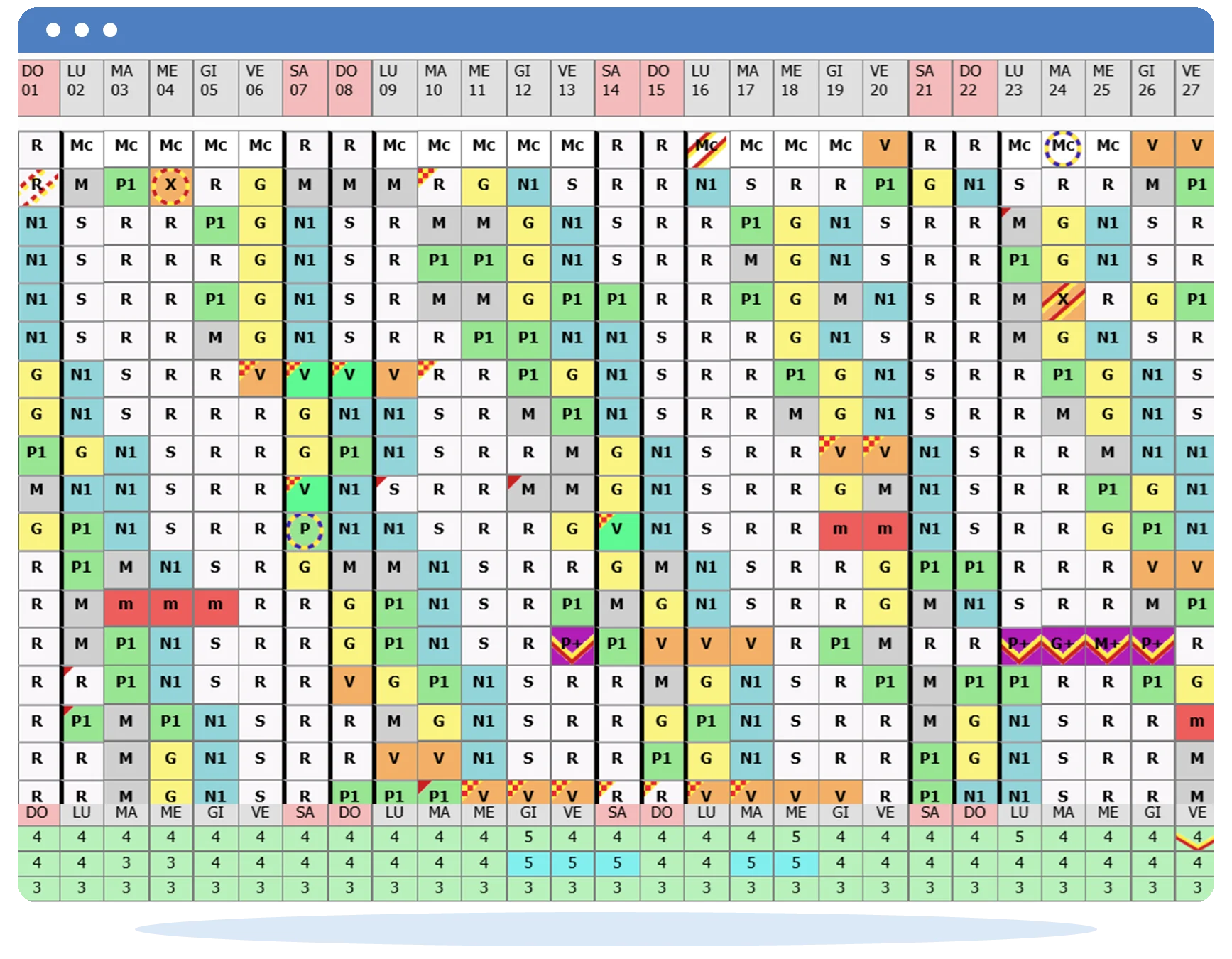
Roster board
The single monthly view planners already know: row = staff member, column = day, short codes (M, P, N, R, F, PD…), symbols and colors customizable by the ward. Real-time recalculation on every change; A4/A3 printing.
Counters and Smart Grid
Next to every staff member, unlimited counters: planned hours, gross/net monthly hour debt, running annual balance, standby availability hours, remaining leave, overtime. The Smart Grid projects the theoretical hours of the matrices onto week/month/year to verify that the hour debt is covered before publishing.
Not just nurses: physician rostering
Rostering medical staff differs substantially from rostering nursing staff — and ALISEO ES handles both, by changing the configuration, not the tool:
Nursing ward
Sub-services by staff category (planner, nurses, healthcare assistants (OSS), rehabilitation staff) and counts by time slot: morning, afternoon, night, standby availability.
Medical team
Structured by activity, with corresponding counts: operating theatres (morning/afternoon), intensive care, day and night anaesthesia on-call shifts (guardie), surgical emergencies, day surgery, radiology and endoscopy (NORA), pre-admission, extra-hours activity. A model that also fits radiology and outpatient clinics, and covers the common organization-wide services shared across wards.
One system, the same checks, the same engine: what changes is the configuration, not the tool. And governance stays separate: the Nursing Directorate acts on the nursing and support staff groups, the Medical Directorate on the medical staff groups — even grouped differently — while the Medical Direction sees all the roster boards.

The 4 planning modes (you can combine them)
Free-form manual
For planners who want cell-by-cell control, with real-time compatibility checks: no night shifts for staff exempted from them, the 11-hour rest, the working-time profile respected.
Predefined grids / shift matrices
Repeating sequences, applicable to the group or to a single staff member, even several matrices on the same roster board. Three types: simple, row by row, multiple sub-services.
Automatic completion
From an empty or partial plan: the system fills the gaps while respecting leave, leaves of absence, sickness and preferences already agreed.
Automatic generation
The optimization engine born from research with the University of Udine generates the ward plan in a few minutes, balancing regulatory constraints, fairness and preferences. Discover the engine →
The modes combine freely: start from the matrices, complete automatically, fine-tune by hand — the checks stay active throughout.
Checks while you plan, not afterwards
Every cell you enter is verified on the spot, not once the plan is finished: rest periods (11h), individual exemptions, working-time profile, MIN/MAX thresholds. Before publication, the pre-validation checks run the plan through four families of verifications (formal, regulatory, organizational, staffing levels) up to the message “No blocking errors found”. Violations are blocking as prevention and tracked in mid-month emergencies.
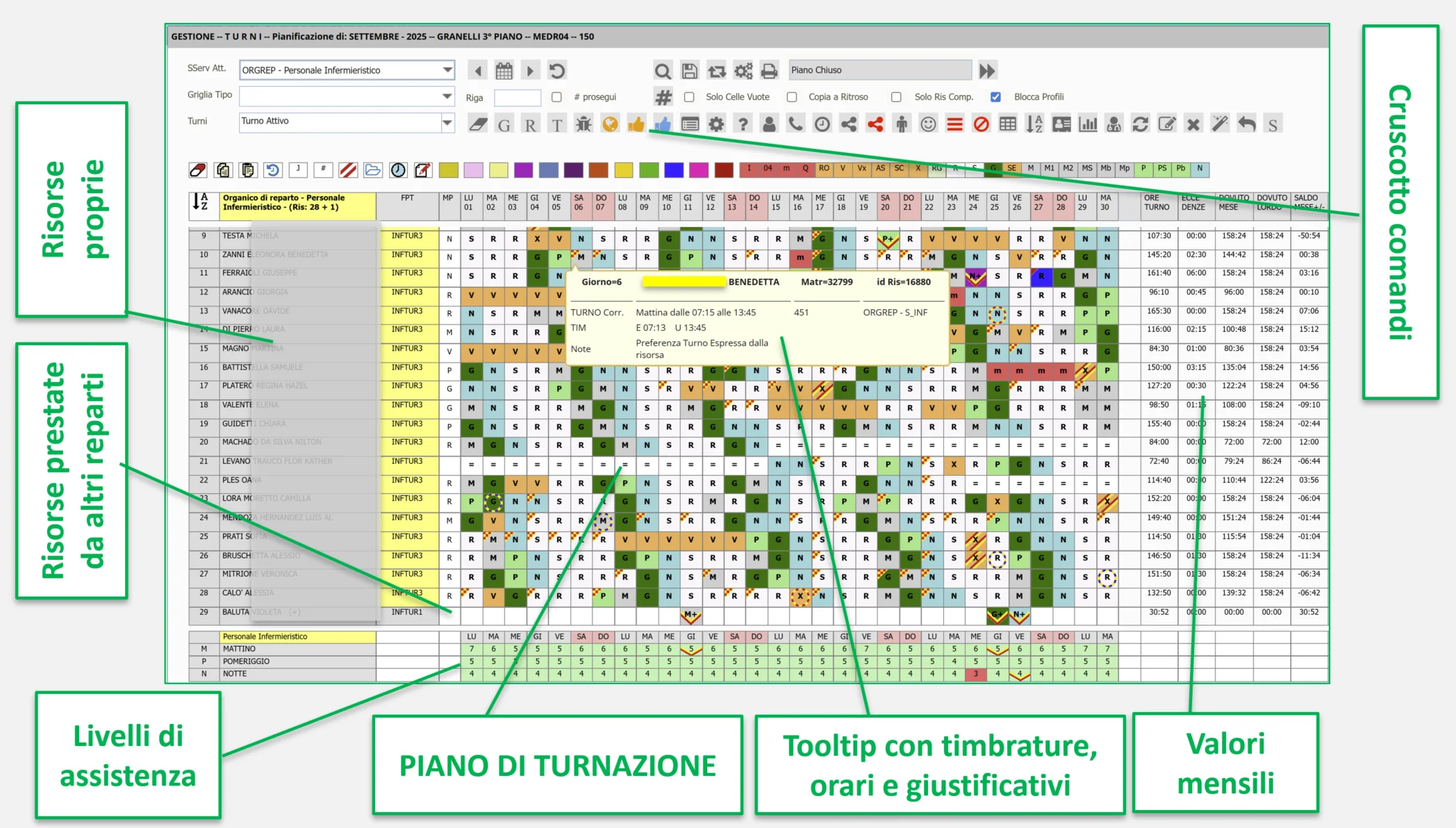
What about the ward’s difficult cases?
- Active on-call and standby availability — planned by quantity/qualification, automatic fair distribution of on-call shifts, standby caps per staff member.
- Staff loans between wards — a tracked workflow, visible both in the lending ward’s plan and in the receiving ward’s.
- Search for redeployable staff — including staff on rest days, with checks on the 11 hours and consecutive days.
- Restrictions and prescriptions (Occupational Medicine) — visible on the roster board, for compatible assignment.
All the distinctive features, in a checklist for tender specifications: Features →
Frequently asked questions
How does rostering work in ALISEO ES?
You plan by rostering group (the ward or service) with four modes you can combine: manual, grids/shift matrices, automatic completion and automatic generation. The system checks staffing needs, hour debt and regulatory constraints in real time.
What is a rostering group?
It is the planning unit of ALISEO ES: the ward or service, not the individual person. It aggregates the staff of the same cost or responsibility center and can be structured into sub-services and professional roles.
How do I make sure the ward’s staffing needs are covered?
With MIN/OPT/MAX staffing levels by time slot and by day, public holidays included: MIN and MAX are blocking thresholds, deviations are highlighted with colors and counts update with every change.
Can I keep planning manually?
Yes. The free-form manual mode remains available, with real-time compatibility checks (11-hour rest, night-shift exemptions, working-time profile): errors are flagged while you plan, not afterwards.
How long does automatic plan generation take?
A few minutes for the ward’s monthly plan, with the optimization engine born from research with the University of Udine. The result can be reviewed and edited before validation.
Does ALISEO ES also roster physicians?
Yes. Physician rostering, structured by activity (operating theatres, on-call shifts, intensive care, NORA) rather than by staff category, is handled with dedicated rostering-group configurations — like those for radiology and outpatient clinics.
From the blog
Physician rostering: by activity, not by staff category
Physician rosters are not planned like nursing rosters: activities, on-call shifts and standby availability, fairness. How to manage them in a single system.
Healthcare staff rosters: what the regulations require (and how to comply every month)
Rest periods, average working hours, derogations: what Italian Legislative Decree 66/2003 (working time), Law 161/2014 and national collective agreements (CCNL) require of healthcare staff rosters, and how to comply every month.
Want to see your ward’s roster board in ALISEO ES?
Pick the date and time of your demo, or write to us directly.
Book a demo